 Loose Threads
October 10, 2026 at 15:43:03 UTC
My Simple Setup
I've tried plenty of development and AI tools along the way, and I've finally settled on a stack I'm happy coding with. I used to be wary of AI tooling, and it's taken a long time to get comfortable with it. For now, though, I think I've found a balance that works for me.
This post also serves as a checkpoint: a record of what I use and how I think about coding today. Maybe I'll look back in a few years and see what's changed.
You can find my ever-changing config here .
0. Prelude: A Bit About Me
I've tried plenty of video games, but I especially enjoy fast-paced ones that challenge me mechanically. I've sunk thousands of hours into StarCraft II and Dota 2. I also love being able to customise things to an excessive degree. Those same preferences carry over into my development setup:
I want tools that keep up with me and let me make them my own.
1. Act I: Past Tooling
Before getting into what I use now, here's a quick look at the editors, AI tools, and other development tools I've tried along the way.
1.1 Editors
I started my coding journey with Atom before moving to Sublime Text. I used Vim for a while (because I couldn't figure out how to quit), then finished university using VS Code. After that, I spent a month coding in Notepad before moving to Neovim.
Since then, I've tried Emacs for a month, given Cursor a go, and had to use Visual Studio for an old C# codebase. Eventually, I moved back to Neovim.
I've also spent less than a month with each of these:
- JetBrains IDEs, including IntelliJ IDEA.
- NetBeans.
- Eclipse.
1.2 AI Models and Tooling
I've tried models from the GPT, Claude, DeepSeek, Kimi, GLM, MiniMax, Grok, Gemini, Qwen, and Llama families.
For the tools themselves, I've used Claude Code, Codex, OpenCode, Gemini, and ChatGPT's desktop app.
1.3 Dev Tools and More
The experimenting hasn't stopped at editors and AI. I've used Docker for containerisation and worked with various cloud platforms. I've also moved between Linux distributions, including Ubuntu, Linux Mint, Arch Linux, Fedora, and Manjaro.
For terminals, I've tried Ghostty, Alacritty, Kitty, and KDE's Konsole. I've used Hyprland, i3, and awesomewm as window managers, along with Bash and Fish for my shell and tmux, Herdr, and Zellij for terminal multiplexing.
Other tools I've used include Git on the command line, the GitHub CLI, and fzf for search and navigation.
2. Act II: What I Use Now
With all that experimenting behind me, here's what I use now.
2.1 Editor
Neovim is where I've landed after trying everything from Notepad to full IDEs. The main appeal is the speed: compared with VS Code, it just feels faster to me and gives my code more screen space. Coming from StarCraft II, even the seemingly archaic keybindings feel like hotkeys to learn and practise. Once they become familiar, I can move through a codebase quickly, and there's something satisfying about it that feels a little like playing a video game.
The other big draw is the customisation. I'm not limited to adding plugins; I can change how the editor behaves and how I interact with it. That lets me build a setup around what I need and make it work the way I want it to.
2.2 AI Workflow
2.2.1 The Workflow
AI took longer for me to settle into than the rest of my tooling. I like understanding what my code is doing, and handing that work over to a model initially felt at odds with why I enjoy programming. What changed was finding a way to use it without giving up the parts I care about.
I want to maintain my own mental model of the codebase, so reviewing AI-generated code is part of the work, not something I can skip.
Review time is part of the task. AI doesn't save me time on every task.If reviewing and fixing generated code takes longer than writing it myself, it hasn't helped.
There have been plenty of occasions where I've spent longer fixing generated code than I would have spent writing it myself.
Where it does help is with repetitive or well-defined tasks whose results are easy to review, such as:
- Applying a repetitive change across files, such as renaming a configuration key and updating its references.
- Writing tests for a function whose expected behaviour and edge cases I can clearly describe.
- Translating SQL column names to a struct.
- Updating documentation after a change I've already implemented.
Even when the generated code solves the immediate problem, I've found it can miss the bigger picture. That includes how the solution fits into the rest of the codebase, how it might need to grow, and how to structure it cleanly so future changes don't become a headache. Those are decisions I still want to make myself.
For that reason, I keep the tasks I delegate narrowly scoped. I give AI work I already know how to approach and feel confident it can handle, so I can judge the result rather than just hope it's right. If you're looking for large-scale agent orchestration, you won't find it here.
2.2.2 My AI Setup
Most of the tools I enjoy using run in the terminal, so OpenCode felt like a natural fit for my AI workflow. Its configuration sits alongside the rest of my tooling, and there's enough customisation to make it work the way I want. With tmux, I can keep Neovim in one window and OpenCode in the next, switching between writing code and asking for help without leaving the terminal.
It also gives me the features I want from an AI harness: configurable permissions, custom agents, MCP integration, and the freedom to choose the models I use. Currently, I only use MCP integration for Mobbin . I can shape OpenCode around my workflow, rather than change my workflow to suit it.
2.3 Dev Tools
The rest of my setup follows the same preference for terminal-based tools I can make my own. On Linux, I use Arch Linux with Hyprland and Ghostty. On Windows, I use WezTerm and GlazeWM. The tools differ between the two, but tiling window managers let me arrange my workspace around what I'm doing.
Fish is my shell, and tmux keeps my terminal sessions organised. That gives me room for my editor, OpenCode, and whatever commands I'm running without putting everything in a single window. I use fzf for search and navigation, Git on the command line for version control, and the GitHub CLI for working with GitHub.
For any containerisation, I use Docker. It's another tool I reach for when the project calls for it, rather than something every project needs. The aim is a familiar setup that stays out of my way, with each tool doing a job I actually need.
2.4 Hardware
The customisation extends to hardware, too. Here are some of my Corne keyboards, which I soldered together:
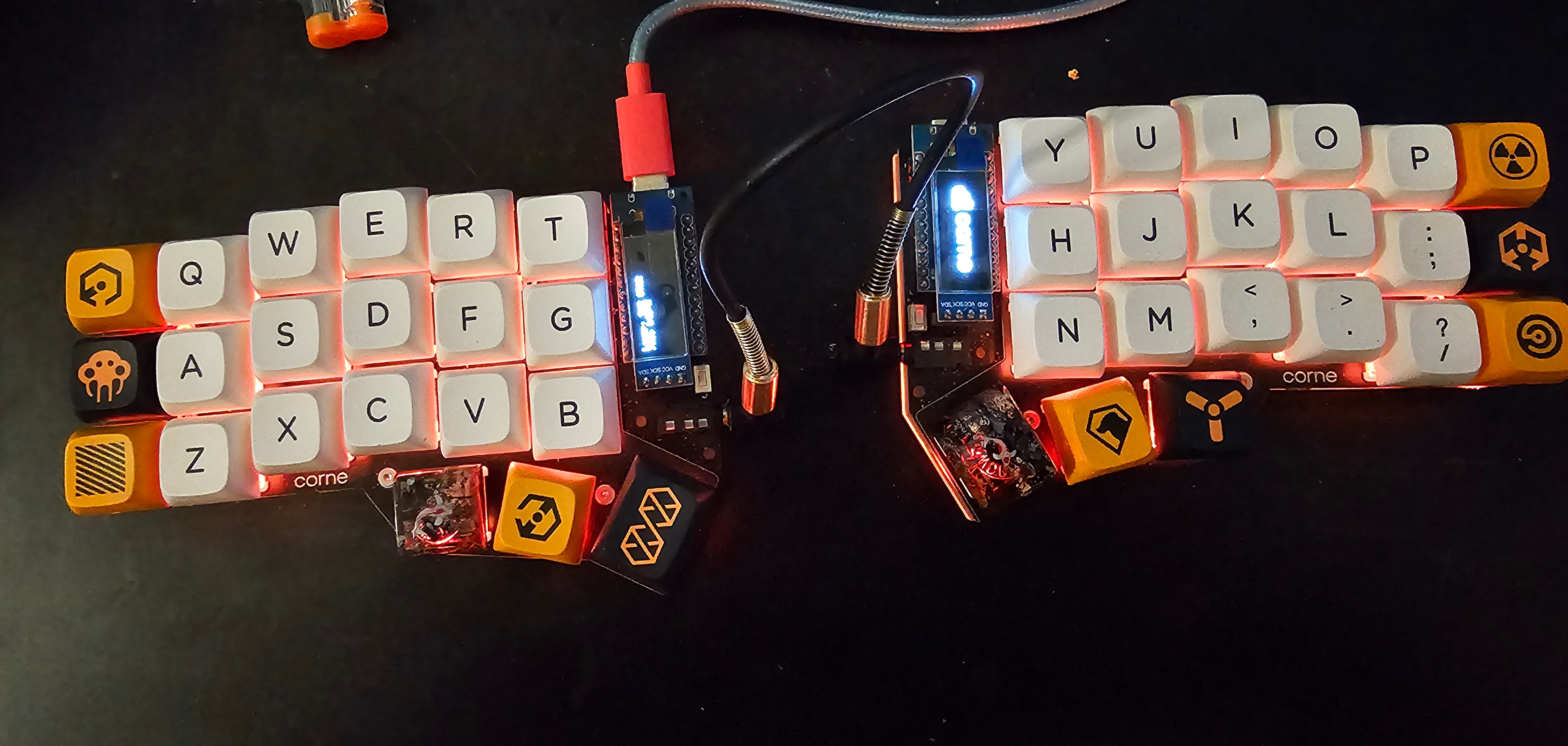
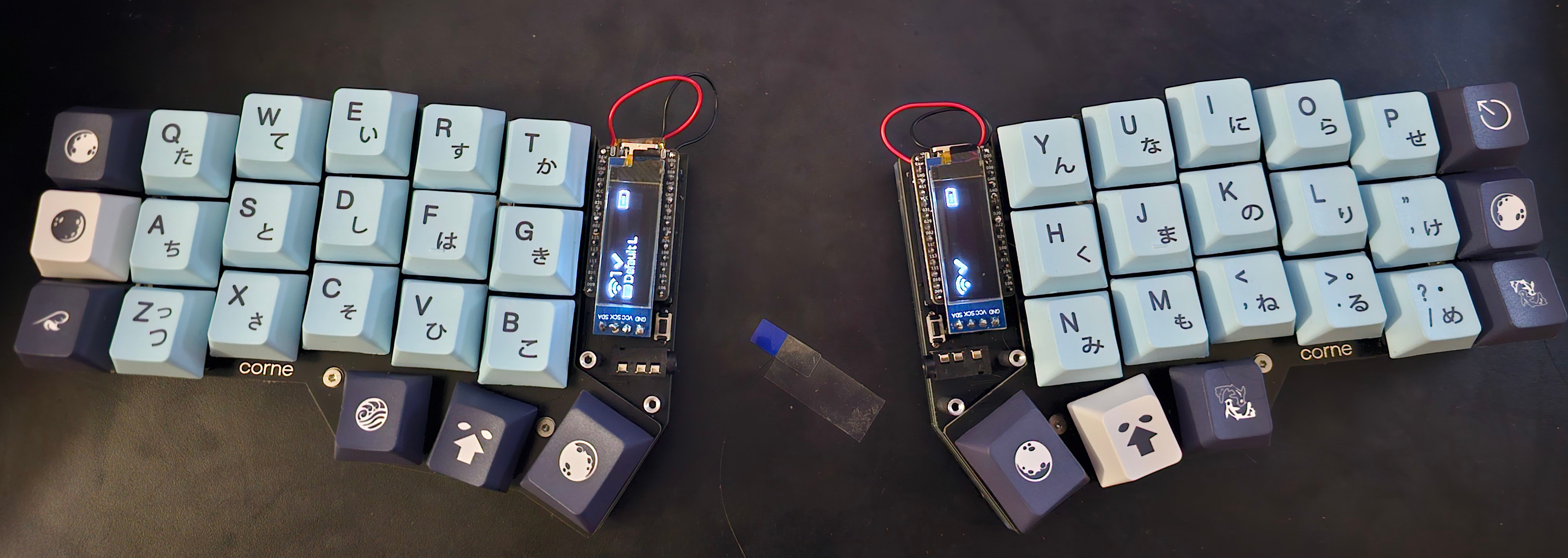
Other than those, I don't have any other custom hardware, though a macropad, trackball, or USB foot pedals might be next.
3. Act III: My Coding Philosophy
Looking at that setup, there's a common thread: I like tools that let me work quickly and make things my own. That runs from Neovim's keybindings to my window managers and even the keyboards I've soldered together. But choosing the tools is only part of it. How I use them matters more than which ones I pick, and trying so many has helped me work out a few principles I want to keep in mind.
3.1 Simple, Not Minimal
Despite the title of this post, I don't think the simplest setup is necessarily the one with the fewest plugins or the shortest config. Neovim, tmux, and a tiling window manager all take some learning, but that effort can make everyday work feel simpler. Equally, a plugin with sensible defaults can save me from maintaining a solution of my own.
Simple means understandable and manageable, not stripped bare.
I want to be able to change something when it stops working for me, not feel stuck with a collection of settings I've copied and forgotten about.
3.2 Understanding Over Convenience
Getting something working is satisfying, but I also want to know why it works. That doesn't mean writing everything from scratch or refusing help. It means being willing to look closer when I'm relying on something I don't understand, especially when it affects the behaviour of the program.
That's why my AI workflow centres on narrowly scoped tasks and reviewing the result. A passing test is useful, but I still need to understand the change and decide whether it belongs in the project.
Once I keep the code, maintaining it is my responsibility, regardless of who or what wrote the first version.
3.3 Tools Should Earn Their Place
Having tried so many tools, it's tempting to keep looking for the next one that will make everything click. But being interesting isn't quite the same as being useful. Docker has a place when I need containerisation; it doesn't need to be part of every project. The same goes for editor plugins and AI integrations. I'd rather add a tool to solve a problem than invent a problem to justify adding it.
That also means being willing to remove things. If two tools do the same job, or I spend more time fixing an integration than using it, I should at least question whether I still need it. A tool doesn't have to be bad for it to be a poor fit for me.
3.4 Knowing When to Stop Tweaking
This is probably the hardest part given how much I enjoy customisation. As I mentioned at the start, learning keybindings and getting quicker with my tools can feel a little like playing a game. There will always be another shortcut to improve, another plugin to try, or another way to arrange my windows. Some of that is useful, and some of it is just a hobby. I don't think there's anything wrong with either, as long as I'm honest about which one I'm doing.
When I sit down to work on a project, though, I want the setup to be familiar enough that I can leave it alone. Getting faster with the tools I already have can be more valuable than replacing them again. At some point, I need to stop configuring the editor and write something in it. That's the balance I want this checkpoint to capture: a setup I enjoy making my own, without letting the setup become the whole project.
4. Epilogue: Wrapping Up
This isn't a recommendation that everyone should use Neovim or copy my config. It's where I've landed after trying a lot of different things, and it will probably keep changing as I do.
For now, I want a setup that feels natural to use, gives me room to customise, and helps me build things I understand. AI can be part of that without taking over the whole process. The aim isn't to find a perfect collection of tools; it's to find something I'm happy working with, and then get on with the work.
My current tools at a glance
Editor: Neovim.
AI: OpenCode, with Mobbin for MCP
integration.
Linux: Arch Linux, Hyprland, and
Ghostty.
Windows: GlazeWM and WezTerm.
Shell and sessions: Fish and tmux.
Search and navigation: fzf.
Version control: Git and the GitHub
CLI.
Containerisation: Docker.
Keyboard: Custom-built Corne keyboards.
4.1 Future Changes
That doesn't mean I've stopped experimenting. A few things I'm currently considering are:
- Removing language server integrations from Neovim. I've been having fun coding without them.
- Building a tool of my own as I've become more interested in systems programming.
- Moving to NixOS for a more reproducible development environment, potentially using containers or a VM to keep project environments isolated and address some of my security concerns.
5. Extra: Mentioned Tools
5.1 Editors
- Atom
- Sublime Text
- Vim
- VS Code
- Notepad
- Neovim
- Emacs
- Cursor
- Visual Studio
- JetBrains IDEs
- IntelliJ IDEA
- NetBeans
- Eclipse
5.2 AI Models and Tools
- GPT
- Claude
- DeepSeek
- Kimi
- GLM
- MiniMax
- Grok
- Gemini
- Qwen
- Llama
- Claude Code
- Codex
- OpenCode
- ChatGPT's desktop app
- Mobbin